MF777 Game Withdrawal Information for New Users
Understanding the withdrawal process is important before using any online gaming platform. MF777 Withdrawal information can help users learn about possible payment methods, account requirements, processing steps, and common withdrawal problems. The exact options and limits may change, so users should always check the latest information shown on the official platform before making a request.
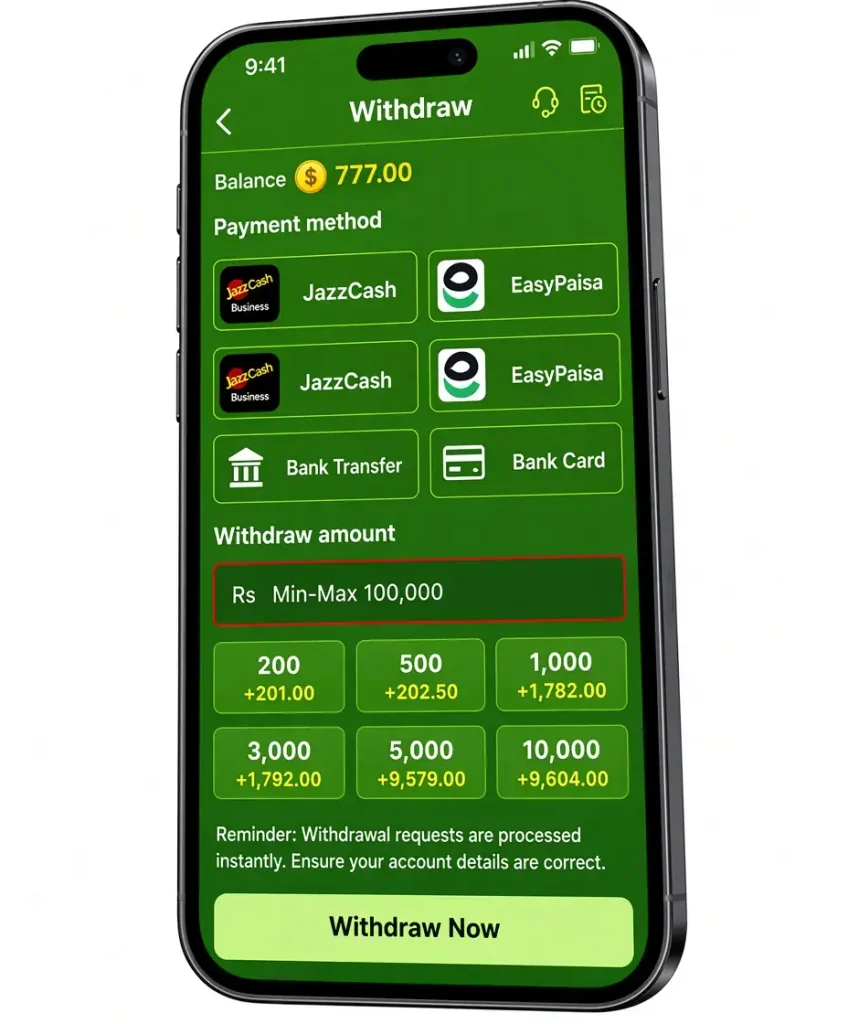
How to Withdraw from MF777
Follow these basic steps:
- Log in to your MF7777 account.
- Open the Withdraw or Withdrawal section.
- Select an available payment method.
- Enter the amount you want to withdraw.
- Add or confirm your payment details.
- Check all information carefully.
- Submit the withdrawal request.
- Save the transaction details for reference.
Payment Methods
Payment options may differ over time. Pakistani users may see digital payment services or bank-related options, depending on what the platform currently supports.
JazzCash
If JazzCash is available in the withdrawal section, enter the correct account details and carefully check the amount before confirming the request.
Easypaisa
Easypaisa may be available as a local digital payment option. Users should only select it when it appears in their current withdrawal options and should verify the receiving account information.
SadaPay
If SadaPay is supported, check the required account information before submitting a withdrawal. Do not share your PIN, password, or OTP with another person.
NayaPay
Users who see NayaPay as an available option should follow the instructions displayed on the platform and confirm the recipient information before completing the request.
Minimum Withdrawal Amount
The minimum withdrawal amount is PKR 200, while the maximum withdrawal amount is PKR 100,000 per request. Before submitting a withdrawal, users should check their available balance and make sure the requested amount is within the current limits. Withdrawal limits may also depend on the selected payment method or account rules.
Withdrawal Processing Time
Withdrawal processing times can vary. Some requests may be processed quickly, while others may take longer because of account checks, payment-provider processing, incorrect information, or temporary technical issues. If a request remains pending, check its status first instead of submitting multiple requests.
Common Withdrawal Problems
- Withdrawal Pending—Your request may still be processing. Check the withdrawal status.
- Wrong Account Details—Incorrect wallet or bank details can cause a withdrawal to fail.
- Minimum Limit Not Met – Make sure your requested amount meets the current minimum limit.
- Withdrawal Rejected – Check your account details and withdrawal requirements.
- Payment Delay—Sometimes payment processing can take extra time.
- Balance Issue – Make sure your available balance is enough for the withdrawal.
- Verification Required—Some accounts may need additional verification before withdrawal.
- Payment Method Unavailable – A payment option may temporarily be unavailable.
- Technical Problem – Try again later if the withdrawal page is not working properly.
- Support Needed – If the problem continues, contact the platform’s support team with your transaction details.
Important Things to Check
Before using the MF777 Game Withdrawal, check these details:
- Minimum withdrawal amount
- Maximum withdrawal limit
- Available payment methods
- Processing time
- Account verification requirements
- Any applicable terms or fees
- Current withdrawal status
Final Words
MF777 Game Withdrawal is generally handled through the withdrawal section of the user’s account. The exact payment methods, limits, and processing times may change, so users should check the current information before making a request. Enter payment details carefully and keep account credentials private. If a withdrawal is delayed or rejected, checking the transaction status and account information is a useful first step. Users should also avoid sharing passwords, PINs, or OTP codes with anyone. Most importantly, only use funds and services you understand and stay within your personal limits.
FAQs
Log in to your account, open the withdrawal section, select an available payment method, enter the amount, and submit the request after checking your details.
If JazzCash appears among the current withdrawal options, you can follow the instructions provided for that payment method.
Easypaisa can only be used if it is currently listed as an available payment option on the platform.
A withdrawal may remain pending because of processing, account checks, payment details, or temporary technical issues.
Check your balance, payment information, withdrawal limits, and account status. If the problem continues, contact the platform’s support team.